Showing posts with label websites. Show all posts

Thursday, February 26, 2009

I won!!

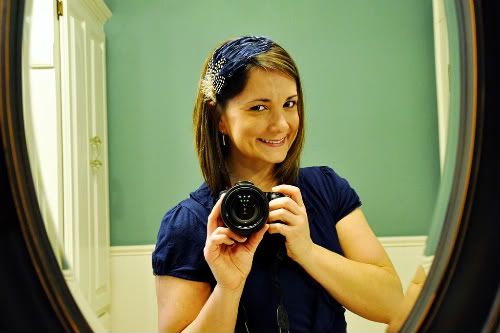
I hardly ever win anything. That's just the way my luck works. So you can only imagine my surprise when I won this oh-so-cute and oh-so-me headband from my friend Dawn's blog, Dawn's Diversions. (Thank you soooo much, Dawn!!!)

Photobucket


I absolutely love it!! Of course, I couldn't post of pic of me wearing it yesterday after I received it in the mail because, well, I was in frump-a-shlump mode (aka: greasy hair, sweats, no makeup). Today, however, I have somewhere to be, so I decided to take a shower and put on a little makeup . Believe me, you would thank me for not posting a picture yesterday had you seen me. : )

Anyway, if you want one like it or in a different color, check out the Feather By Feather Etsy shop. Be sure to tell her Melinda and Dawn sent you.

Wednesday, November 19, 2008

Create a widget, spread the joy

I received a request to explain how to do the Widgets that readers can grab and place on their own sites. Such as
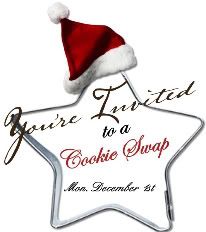


and


It took me forever to figure out how to do this. I searched sites upon sites upon sites and finally was able to compile enough information on how to do this. In the end, it couldn't have been any easier.

Step 1: Take a photo or graphic (mine were created using Scrapblog) that you would like to use for you widget and store it in an online photo bank such as Photobucket.

Step 2: Make sure that your photo/image has been reduced in size - in Photobucket, they have preset sizes and I believe I set mine to the small - but you can play around with it until it suits you and your needs.

Step 3: Once your image is the way you like it and has been saved, Photobucket will provide you with a number of different codes such as "Share URL", "Direct Link", "HTML Code", and "IMG Code". The latter (the "IMG Code") is the one you will want to know for creating your Widget.

Step 4: If you are posting this in your sidebar you will want to "Add a Gadget", then choose the "HTML/Java Script" button. If you are posting this within a post, you will want to "Edit Html" and embed the code there.

Step 5: The code you need is as follows but there are a couple of things you need to notice: number one (the most obvious), is replace the "not-a-real-namespace/yourblogURL" places (there are 2)with your actual blog URL and replace the "not-a-real-namespace/yourPhotobucketIMGCode" places (again, there are 2) with the code from Photobucket we talked about earlier.

Now, the second thing you need to notice is that on the IMG Code from Photobucket they have included a [IMG] before the code and a [/IMG] after the code. You will want to omit those when embedding your code.

And that should be it. I am by no means a techie type of person or a computer genius. This took a good bit of research and I only hope I have presented it to you in a clear and concise manner. If you decide to use the following code, leave me a comment and let me know if it worked.



Tuesday, November 18, 2008

Go Elf Yourself

Okay, here is an explanation of the following post: Last year my sis-in-law introduced me to a website called JibJab - a site for creating eCards and dance videos. By simply uploading a photo or two, you too can make your very own video. The clips are hysterical but the downfall was that we could never share our clips with our friends and family unless they came over to our house; because although it was free to create them, it cost a little bit of money to embed them in your websites or e-mail them out to others.

This year however, JibJab has teamed up with OfficeMax in a promotion called "Elf Yourself" and it is completely FREE! I had to put myself in the video because had I chosen one of the kids, the other would have been put-off and I couldn't choose Josh for the video because, well, I just don't think he would've appreciated it too much.

So if you have a spare minute or two, go Elf Yourself and share it with all.

Monday, October 20, 2008

One of many

I am so behind on my posts! I feel as if I haven't been home for more than five minutes at a time in over a week. So rather than post a really long post (which would require ignoring my boys for a couple of hours while I typed and downloaded), I am going to post a bunch of overdue "stories" one at a time.

First off, Thursday we went to Edmond to have Beau's one-year-old pictures taken. Yes, I realize that I am a month and a half overdue on this task. And yes, I realize I could have done it myself but sometimes it just feels easier to go somewhere else and have someone else deal with your kids.

For almost four years now we have been going to Take 2 for our big family pictures: one, because the owner is a friend of the family; and two, because she is so talented. Take 2 is mostly known for its sports, dance recital, and pageant pics but I love her photos of kids because she moves around with them and lets them do their own thing. You can see his photo proofs here.

Needless to say he was exhausted after such a long day of running around and smiling for the cameras. Aren't they just little angels when they are fast asleep?!

Saturday, September 13, 2008

Something new

Obviously I have far too much time on my hands...I mean really - three posts in one day; it's a little obsessive.

I am trying out a new banner. I can't decide if I am that crazy about it or not. I wish I could get it to stretch all the way across my site but I just can't seem to figure out how to do it...anything outside of "posting" is beyond my realm of computer understanding. Once you start messing with all of the html mumbo-jumbo, I'm lost.

Anyway, I created the new banner with Scrapblog, a really fun and FREE digital scrapbooking website.

Let me know what you think. Should I leave it or change it back?

Just passing it along

For those of you who enjoy contests and free things these are some great tips from some of my friends. Please read it all so you don't miss out on some great information...

First of all, my friend Amy is always entering these "Blog Giveaways." I kind of thought they were a hoax just to get people to their site; turns out she actually won one so I thought I would give it a shot. You can see the prize (a gorgeous necklace) and enter for the contest too over at The Pink Potpourri . Good luck to everyone!

Secondly, my friend Katie is a woman on a mission...she loves free stuff and she is very successful in finding it! One of my favorite tips she has selflessly passed along is about Smithsonian Day, which takes place on September 27. If you click HERE, you too can print out free tickets to museums in your area. For us, it is pretty limited to just seven museums (and a few of them are a little too far to drive to) but for my friends and family up in New York and D.C. and in Georgia, your possibilities are endless.

I would love to hear from those who take or plan to take advantage of these great tips and thanks girls, for passing along your useful knowledge!

Wednesday, August 20, 2008

Party preparations

Since I already posted one of my favorite websites, why not another one?!

Beau's first birthday is next weekend and I am trying hard to get everything done. Since moving out to small town America, I have found the once simple task of party prepping to be a lot more difficult and time consuming.

A lot of my "shopping" is now done via the Internet. It is a lot less time consuming, no hour drives to and from places, and I don't have to drag the two rug-rats all over creation.

My sister-in-law told me of a website where you can download your own pictures and load them onto a number of invitations that go along with your party theme and then you can either print them out yourself or for a little extra money you can have them printed at the nearest Wal-Mart (which for me is still 25 minutes away). Uprint Invitations is VERY reasonably priced and I was really happy with the way Beau's invitations turned out. My biggest complaint would be the fact that the pictures, when downloaded, crop differently than what you may have, so cropping them over and over again to get the right look takes a good bit of time (I eventually gave up).


Scrapbooking for those who can't find the time

I don't have too much to post right now so I thought I would give you all a link and coupon for one of my favorite sites on the Web.

My Publisher is perfect for those who just don't have the time to scrapbook every event that happens in life. The site publishes not only hardcover photo books of extremely high quality but they also publish smaller paperback photo albums and they have just introduced cards and calendars to their product list.

Their stuff is somewhat pricey but well-worth every penny and if you download their program, they send you coupons like this one and even ones that are buy one get one free, which is great for gifts. For example, I made a photo book of our trip aboard the Disney Cruise Ship. I had received a coupon for buy one get one free and since the coupon is only good for the same book, I had the extra printed for my mom for Mother's Day. She absolutely loved it!

My Publisher is easy extremely easy to use. They have many options as far as book sizes and layouts are concerned and it allows you to zoom in on photos, change them to black and white, etc. Best of all - it is free to download and try out!

Before you download it, drop me a line because I can e-mail you an invitation. I get $20 off for referring a friend and you get a FREE photo book. It is a Win-Win situation! So check it out and let me know what you think.


Turn digital photos into beautiful greeting cards, calendars, and coffee table books.
Can't see everything in this e-mail? Click here.
Please e-mail customer service with any questions/comments at customerservice@mypublisher.com
Unsubscribe Me Edit My E-mail Address
MyPublisher 400 Columbus Avenue, Valhalla, NY 10595
About MyPublisher Contact Us Support Shipping Privacy Policy Terms of Service Press Room


Tuesday, July 22, 2008

A league of extraordinary gentlemen

Well, they are not quite gentlemen yet, but by accomplishing some pretty extraordinary feats since summer began, Jack and Beau are both getting a little too close to "big" a little too fast for mama.

For Beau the summer has been filled with many firsts including but not limited to walking. At eight months old he was pulling himself up and taking a step or two; and so at 10 months, he is not only walking but climbing as well. Baby gates have gone up and outlet covers have gone on; but somehow no matter how many precautionary steps I might take, he still manages to get into anything and everything.

Jack, on the other hand, who mastered walking years ago, has moved on to bigger and better, albeit scarier things. Learning to swim topped our "To Do" list this summer. Once Nana and Papa Brookshire's pool install was completed, swimming lessons for Jack quickly followed. Although Jack still uses his swimmies for security reasons (which is okay by mom) he can swim without them. He now loves to dunk his entire head in the water and he went from being afraid of the water slide to our having to drag him off of it.

I had originally wanted to post some video with this entry; but it just isn't happening right now...I will try again at a later date . One thing I love about blogging is that I am discovering all of these new, and more importantly FREE, little gadgets on the web that I can use here on the blog. So below is something I discovered at Smilebox.com, thanks to the August issue of Parents magazine. I sure hope it works.

Click to play Boys will be boys
Create your own scrapbook - Powered by Smilebox
Make a Smilebox scrapbook